
Sean — Batch Feature Line Elevation Point Tool
CA$49 / year — annual licence
ET-007 • Batch Feature Line Elevation Point Tool
One command. Thousands of clicks eliminated.
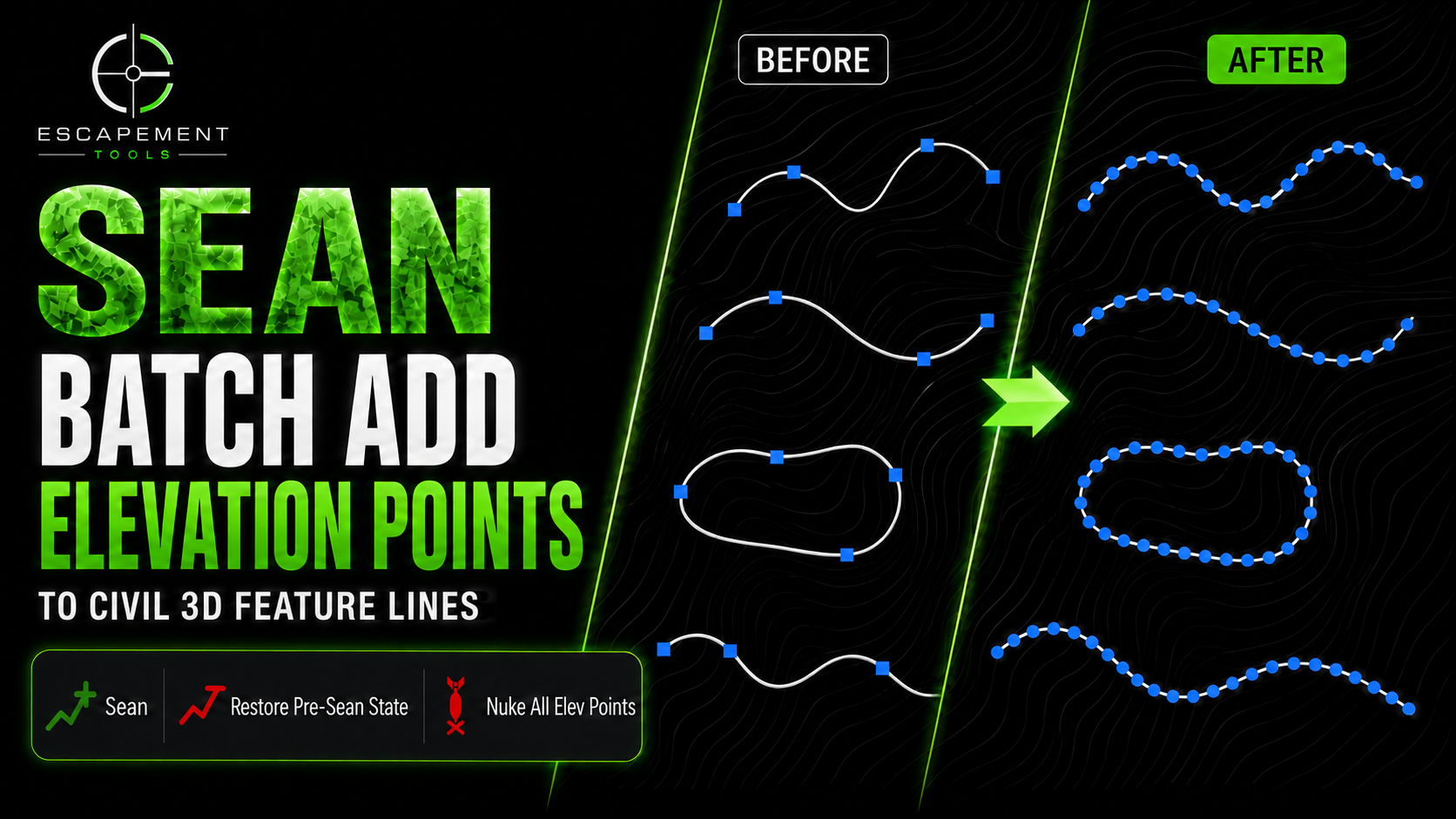
Sean batch-processes Autodesk Civil 3D feature lines by inserting elevation points at a user-defined spacing across an entire selection in a single operation.
Instead of running Civil 3D’s elevation-point workflow one feature line at a time, select your feature lines, choose the spacing, and let Sean process the batch.
See Sean in Action
Why Sean?
Civil 3D’s standard workflow requires elevation points to be added to feature lines individually. On grading models containing hundreds or thousands of feature lines, repeating that process can consume significant design time.
Sean turns that repetitive workflow into a batch operation while keeping the resulting feature lines and elevation points native to Civil 3D.
Select. Set the spacing. Run Sean.
Key Features
✔ Batch-processes large selections of Civil 3D feature lines in a single operation
✔ Inserts elevation points at a user-defined spacing
✔ Creates native Civil 3D elevation points
✔ Preserves existing feature-line geometry and elevations while adding supplemental elevation points
✔ Eliminates the need to edit feature lines individually
✔ Validates each feature line before and after processing
✔ Fully compatible with Civil 3D Undo
✔ Includes dedicated Restore and Nuke tools for managing non-PI elevation points
Proven in Production
Sean was developed from a real production workflow and tested on Civil 3D drawings containing more than a thousand feature lines.
What would normally require repeating the same operation feature line by feature line can be completed as a single batch.
Included Companion Tools
Restore
Need to change the spacing—or return your feature lines to their original condition?
Before modifying a feature line, Sean records its existing non-PI elevation-point population. Restore uses that record to return selected feature lines to their pre-Sean elevation-point state.
Restore the original points, choose a new spacing, and run Sean again.
Restore. Re-space. Continue designing.
Nuke
Need to remove every supplemental elevation point?
Nuke batch-removes all non-PI elevation points from selected feature lines while preserving their PI points.
Nuke is intentionally more aggressive than Restore. Use Restore when you want to return feature lines to their recorded pre-Sean state. Use Nuke when you intentionally want to remove all non-PI elevation points.
Native Civil 3D
Sean works directly with native Civil 3D feature lines and elevation points.
It doesn’t replace your feature lines with proprietary objects or require a separate workflow after processing. Your feature lines remain fully editable using standard Civil 3D tools.
No proprietary geometry.
No one-at-a-time point placement.
Just faster native Civil 3D feature-line editing.
Compatibility
✔ Autodesk Civil 3D 2024
✔ Autodesk Civil 3D 2025
✔ Autodesk Civil 3D 2026
✔ Autodesk Civil 3D 2027
Tested and supported on Civil 3D 2024, 2025, 2026, and 2027.
Licence
✔ Single-user, single-seat annual licence
✔ Commercial use permitted
✔ Updates and email support included during the active licence term
Designed by Civil 3D professionals. Built for Civil 3D professionals.
Field Note
Read: Adding Elevation Points to Civil 3D Feature Lines
Sean ET-007 is available now.
CA$49 / year — annual licence
ET-007 • Batch Feature Line Elevation Point Tool
One command. Thousands of clicks eliminated.
Sean batch-processes Autodesk Civil 3D feature lines by inserting elevation points at a user-defined spacing across an entire selection in a single operation.
Instead of running Civil 3D’s elevation-point workflow one feature line at a time, select your feature lines, choose the spacing, and let Sean process the batch.
See Sean in Action
Why Sean?
Civil 3D’s standard workflow requires elevation points to be added to feature lines individually. On grading models containing hundreds or thousands of feature lines, repeating that process can consume significant design time.
Sean turns that repetitive workflow into a batch operation while keeping the resulting feature lines and elevation points native to Civil 3D.
Select. Set the spacing. Run Sean.
Key Features
✔ Batch-processes large selections of Civil 3D feature lines in a single operation
✔ Inserts elevation points at a user-defined spacing
✔ Creates native Civil 3D elevation points
✔ Preserves existing feature-line geometry and elevations while adding supplemental elevation points
✔ Eliminates the need to edit feature lines individually
✔ Validates each feature line before and after processing
✔ Fully compatible with Civil 3D Undo
✔ Includes dedicated Restore and Nuke tools for managing non-PI elevation points
Proven in Production
Sean was developed from a real production workflow and tested on Civil 3D drawings containing more than a thousand feature lines.
What would normally require repeating the same operation feature line by feature line can be completed as a single batch.
Included Companion Tools
Restore
Need to change the spacing—or return your feature lines to their original condition?
Before modifying a feature line, Sean records its existing non-PI elevation-point population. Restore uses that record to return selected feature lines to their pre-Sean elevation-point state.
Restore the original points, choose a new spacing, and run Sean again.
Restore. Re-space. Continue designing.
Nuke
Need to remove every supplemental elevation point?
Nuke batch-removes all non-PI elevation points from selected feature lines while preserving their PI points.
Nuke is intentionally more aggressive than Restore. Use Restore when you want to return feature lines to their recorded pre-Sean state. Use Nuke when you intentionally want to remove all non-PI elevation points.
Native Civil 3D
Sean works directly with native Civil 3D feature lines and elevation points.
It doesn’t replace your feature lines with proprietary objects or require a separate workflow after processing. Your feature lines remain fully editable using standard Civil 3D tools.
No proprietary geometry.
No one-at-a-time point placement.
Just faster native Civil 3D feature-line editing.
Compatibility
✔ Autodesk Civil 3D 2024
✔ Autodesk Civil 3D 2025
✔ Autodesk Civil 3D 2026
✔ Autodesk Civil 3D 2027
Tested and supported on Civil 3D 2024, 2025, 2026, and 2027.
Licence
✔ Single-user, single-seat annual licence
✔ Commercial use permitted
✔ Updates and email support included during the active licence term
Designed by Civil 3D professionals. Built for Civil 3D professionals.
Field Note
Read: Adding Elevation Points to Civil 3D Feature Lines
Sean ET-007 is available now.