
Snowflake — Civil 3D Contour Label Cleanup
CA$39 / year — annual licence
ET-001 • Contour Label Cleanup Tool
Clean contour labels. Without the cleanup.
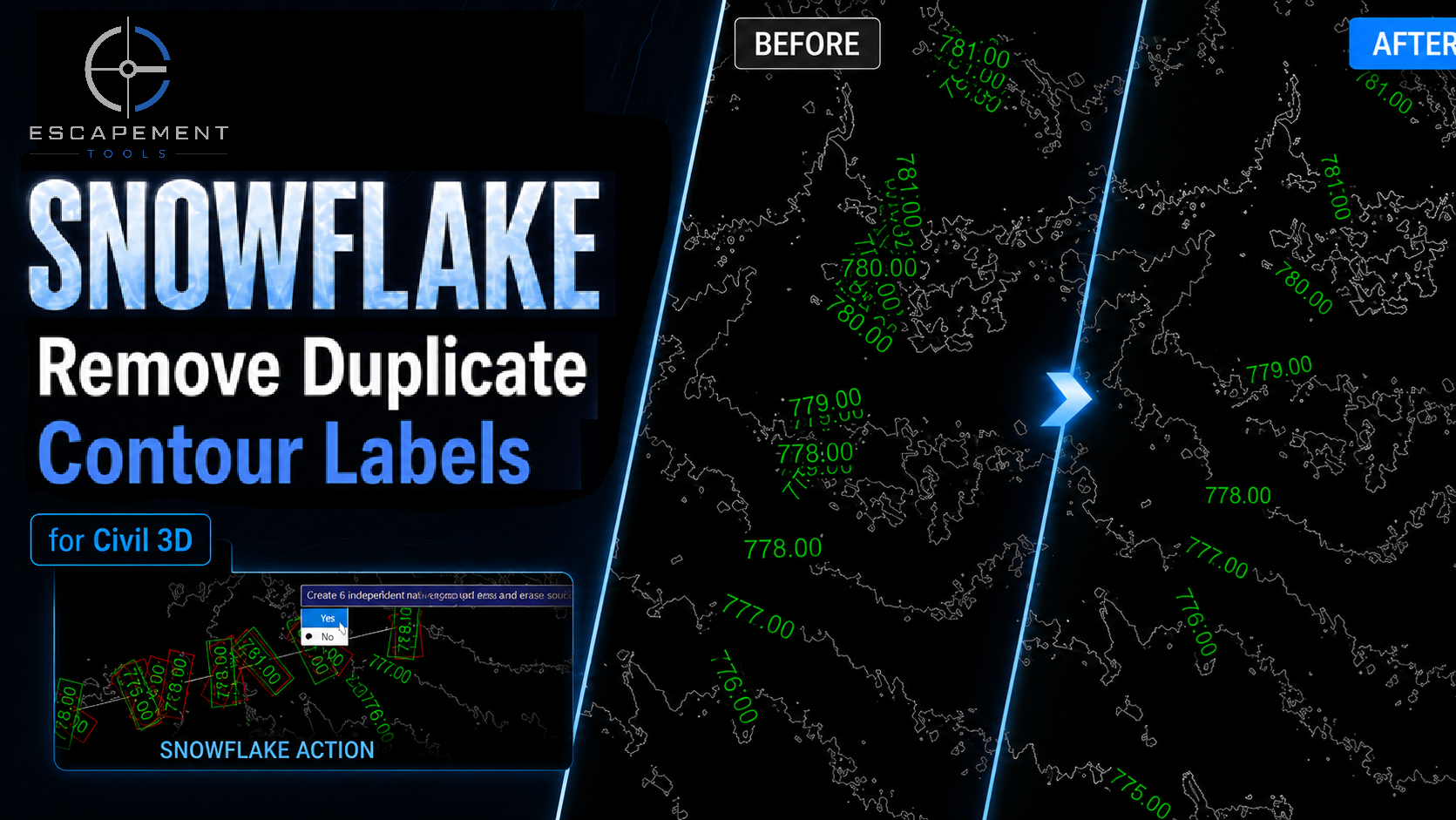
Snowflake cleans up Civil 3D multiple-contour label groups by identifying duplicate, overlapping, and redundant labels, then rebuilding the labels to be retained as independent native Civil 3D contour-label groups.
Keep the speed of Civil 3D’s Contour Multiple workflow—without manually wrestling with the label line afterward.
See Snowflake in Action
Why Snowflake?
Civil 3D’s Contour Multiple command is fast and useful, but complex surfaces can leave you with duplicate, overlapping, or redundant contour labels.
Cleaning them manually means adjusting the label line one vertex at a time—often fixing one area while creating another problem somewhere else along the line.
Snowflake automates that cleanup while preserving native Civil 3D behaviour.
Select. Clean. Continue designing.
Key Features
✔ Analyzes native Civil 3D multiple-contour label groups
✔ Identifies duplicate, overlapping, and redundant contour labels
✔ Determines which labels can be retained without duplication or overlap
✔ Rebuilds retained labels as independent native Civil 3D one-label groups
✔ Preserves label position, style, rotation, and displayed elevation
✔ Keeps retained labels individually editable in Civil 3D
✔ Removes the original multiple-contour label group only after successful validation
✔ Leaves the drawing unchanged if the operation is cancelled or cannot be completed
✔ Fully compatible with Civil 3D Undo
✔ Uses native Civil 3D objects with no proprietary annotation objects
How It Works
Create your contour labels using Civil 3D’s standard Contour Multiple command.
Run Snowflake from the Escapement Tools ribbon.
Select the multiple-contour label group you want to clean up.
Snowflake analyzes the group and identifies the labels that can be retained without duplication or overlap.
Confirm the operation.
Snowflake replaces the original group with independent native Civil 3D one-label groups containing the retained labels.
That’s it.
Continue designing normally and run Snowflake again whenever surface or annotation changes introduce unwanted contour labels.
Native Civil 3D
Snowflake doesn’t explode contour labels into text or replace them with proprietary annotation objects.
Retained labels remain native Civil 3D contour-label objects, preserving normal Civil 3D editing behaviour and compatibility with your existing drawing workflow.
No exploded text.
No proprietary annotation objects.
Just cleaner native Civil 3D drawings.
Built for Production Work
Snowflake was developed from a real production Civil 3D problem: keeping contour annotation readable without giving up the speed and convenience of the standard Contour Multiple workflow.
It removes much of the repetitive cleanup that can follow, leaving you with cleaner annotation and more time for actual design work.
Compatibility
✔ Autodesk Civil 3D 2024
✔ Autodesk Civil 3D 2025
✔ Autodesk Civil 3D 2026
✔ Autodesk Civil 3D 2027
Tested and supported on Civil 3D 2024, 2025, 2026, and 2027.
Licence
✔ Single-user, single-seat annual licence
✔ Commercial use permitted
✔ Updates and email support included during the active licence term
Designed by Civil 3D professionals. Built for Civil 3D professionals.
Field Note
CA$39 / year — annual licence
ET-001 • Contour Label Cleanup Tool
Clean contour labels. Without the cleanup.
Snowflake cleans up Civil 3D multiple-contour label groups by identifying duplicate, overlapping, and redundant labels, then rebuilding the labels to be retained as independent native Civil 3D contour-label groups.
Keep the speed of Civil 3D’s Contour Multiple workflow—without manually wrestling with the label line afterward.
See Snowflake in Action
Why Snowflake?
Civil 3D’s Contour Multiple command is fast and useful, but complex surfaces can leave you with duplicate, overlapping, or redundant contour labels.
Cleaning them manually means adjusting the label line one vertex at a time—often fixing one area while creating another problem somewhere else along the line.
Snowflake automates that cleanup while preserving native Civil 3D behaviour.
Select. Clean. Continue designing.
Key Features
✔ Analyzes native Civil 3D multiple-contour label groups
✔ Identifies duplicate, overlapping, and redundant contour labels
✔ Determines which labels can be retained without duplication or overlap
✔ Rebuilds retained labels as independent native Civil 3D one-label groups
✔ Preserves label position, style, rotation, and displayed elevation
✔ Keeps retained labels individually editable in Civil 3D
✔ Removes the original multiple-contour label group only after successful validation
✔ Leaves the drawing unchanged if the operation is cancelled or cannot be completed
✔ Fully compatible with Civil 3D Undo
✔ Uses native Civil 3D objects with no proprietary annotation objects
How It Works
Create your contour labels using Civil 3D’s standard Contour Multiple command.
Run Snowflake from the Escapement Tools ribbon.
Select the multiple-contour label group you want to clean up.
Snowflake analyzes the group and identifies the labels that can be retained without duplication or overlap.
Confirm the operation.
Snowflake replaces the original group with independent native Civil 3D one-label groups containing the retained labels.
That’s it.
Continue designing normally and run Snowflake again whenever surface or annotation changes introduce unwanted contour labels.
Native Civil 3D
Snowflake doesn’t explode contour labels into text or replace them with proprietary annotation objects.
Retained labels remain native Civil 3D contour-label objects, preserving normal Civil 3D editing behaviour and compatibility with your existing drawing workflow.
No exploded text.
No proprietary annotation objects.
Just cleaner native Civil 3D drawings.
Built for Production Work
Snowflake was developed from a real production Civil 3D problem: keeping contour annotation readable without giving up the speed and convenience of the standard Contour Multiple workflow.
It removes much of the repetitive cleanup that can follow, leaving you with cleaner annotation and more time for actual design work.
Compatibility
✔ Autodesk Civil 3D 2024
✔ Autodesk Civil 3D 2025
✔ Autodesk Civil 3D 2026
✔ Autodesk Civil 3D 2027
Tested and supported on Civil 3D 2024, 2025, 2026, and 2027.
Licence
✔ Single-user, single-seat annual licence
✔ Commercial use permitted
✔ Updates and email support included during the active licence term
Designed by Civil 3D professionals. Built for Civil 3D professionals.